All versions of Kea 2.6 are now EOL
Kea 2.6 reached the end of maintenance with the release of Kea 3.
ReadModern, open source DHCPv4 & DHCPv6 server
ISC’s Kea is the most widely deployed open source DHCP server software.
Kea is open source, and runs on open source Linux and UNIX operating systems. Kea is developed in the open on ISC’s GitLab; we welcome you to open issues and submit patches there. Kea runs on most Linux and Unix platforms, as well as MacOS. If you don’t want to build from our source distribution, we also provide a repository of pre-built packages for most popular operating systems.
Kea is a modern, high performance implementation. Kea is multi-threaded, and when configured for efficient operation, it can be performant enough for a large-scale, short-lease duration environment, which is the most demanding scenario.
Kea has a powerful, well-documented REST API. Kea uses a JSON configuration file that can be modified remotely via set commands and reloaded without stopping and restarting the server.
There is a very useful web-based graphical dashboard. Kea now has a graphical dashboard for monitoring multiple Kea servers. This system, called Stork, uses agents deployed on the Kea servers to relay information to a centralized management platform, providing the administrator with an easy-to-use quick view of system status and activity.
The modular component design is extensible. The Kea distribution includes separate daemons for a DHCPv4 server, a DHCPv6 server, and a dynamic DNS (DDNS) module. Many optional features are enabled with dynamically-loaded “Hooks Modules,” which you need run only if you are using them. You can write your own hooks modules (in C++) or try some of the hooks we offer.
Kea is designed to integrate with existing systems. Kea allows you to separate the data from the execution environment, enabling new deployment options. Your network data - leases, host reservation definitions, and most configuration data - can be located separately from the DHCP server itself, using a Kea “backend.”
Kea supports two database backends; MySQL and PostgreSQL. Besides the obvious benefits (you avoid JSON formatting errors, you can quickly and easily mine the data for other purposes) using a database backend enables multiple Kea servers to share the data. Potential benefits:
host_cmds hook, allows remote management of host reservations via Stork, and permits multiple Kea servers to use a shared host reservations database.ISC used to develop and distribute another DHCP software system, ISC DHCP. Kea includes all the most-requested features, is far newer, and is designed for a more modern network environment than ISC DHCP, which has been End of Life since 2022. Users of ISC DHCP may find these resources helpful in migrating their DHCP server deployments to the Kea server.
By subscribing for our professional support program, you are sustaining the team that maintains the software you rely on.
Contact ISC for Support
| Service Options | Gold support |  Silver support |
Bronze support | Basic (no support) |
|---|---|---|---|---|
| Critical issue response | 30 minutes, 24x7 | 1 hour, 24x7 | 2 hours, business hours only* | Not included |
| Standard issue response | 4 business hours* | 8 business hours* | Next business day | Community support via public mailing list |
| Early vulnerability notifications | 5 days | 5 days | 5 days | 3 days |
| Kea 3.0 hook libraries (RBAC and Configuration Backend are the only commercially licensed ones) | All - Subscriber | All - Subscriber | All - Subscriber | All - Subscriber |
| Stork support | Available | Available | Available | Community support via public mailing list |
| Purchasing | Quotation/Purchase order | Quotation/Purchase order | Quotation/Purchase order | Quotation/Purchase order |
Pricing based on deployment size and service level.
Contact ISC for a quoteYour major design decisions are whether to deploy in pairs for High Availability and use the default CSV file for host and lease data, or to install a separate database for a Kea data “backend.” Some of these decisions can limit your performance; see our Knowledgebase for advice on designing for optimal performance.
Instructions are available for building and installing Kea from the source packages downloadable below. ISC provides pre-built packages for RHEL, Fedora, Ubuntu, and Debian. If you are using any Kea hook libraries, you will also need to install and configure those.
The Kea Administrator Reference Manual (ARM) is the primary reference for Kea configuration. The extensive set of example configuration files in the project repo and our Knowledgebase should help you get started. If you are migrating from an existing ISC DHCP deployment, try the Kea Migration Assistant (a special feature of the ISC DHCP distribution). This will enable you to save your current ISC DHCP server configuration as a Kea configuration file. It will still need some manual adjustment, but this tool should translate the bulk of your configuration.
Most users will benefit from joining the kea-users mailing list. Consider joining our Kea project GitLab to log issues, see what we’re working on, submit patches, and participate in development. Consider deploying Stork for a graphical management dashboard. If your DHCP is critical to your business, we recommend you subscribe for technical support from ISC.
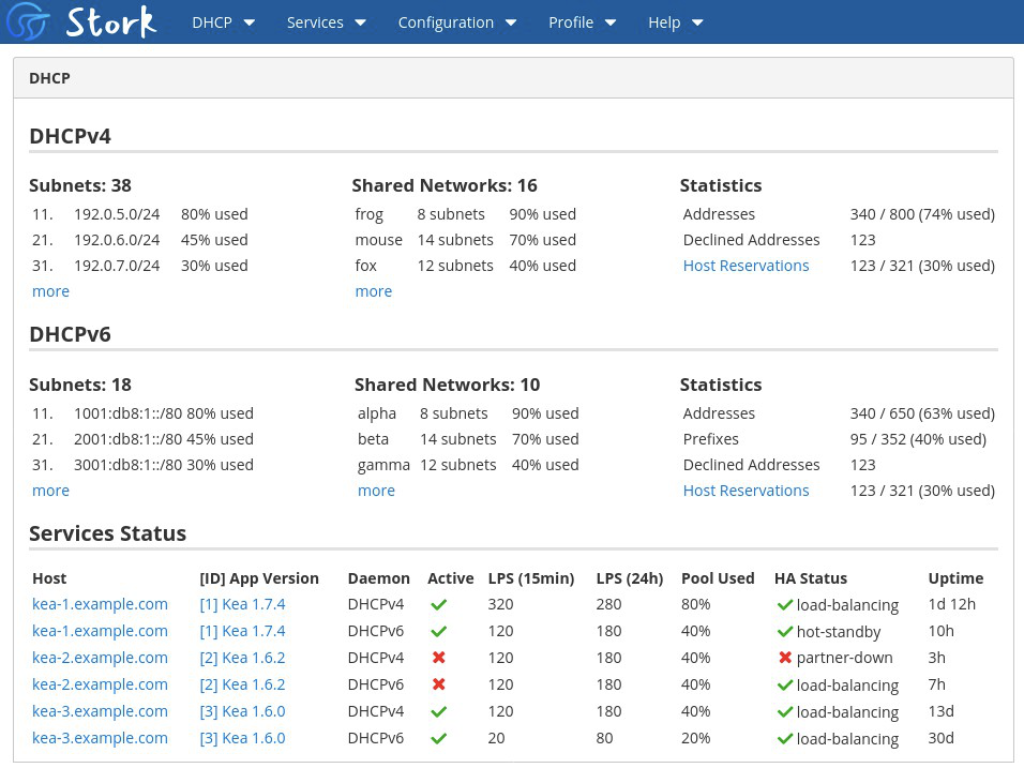
Stork aggregates data about the health of the system hosting Kea, as well as the status and activity level of Kea itself. Parameters reported include memory, CPU utilization, software versions, and uptime.
Stork displays configured pools, with the number of addresses provisioned and assigned, and even tracks pool utilization across shared networks. Graphical elements highlight areas of high utilization to alert the operator to take action. High Availability pairs are monitored and their configured role and status are shown, making it easy to see which servers don’t have a backup established and when a failover event has occurred.
Add, update, and view DHCPv4 and DHCPv6 host reservations, using a graphical interface to select a host identifier, assign a hostname, reserve an IP address, associate a client class, and configure boot file information and DHCP options.

Kea 2.6 reached the end of maintenance with the release of Kea 3.
Read
ISC is excited to announce the release of Kea 3.2.0, a new stable version!
Read
Stork 2.5 is a new development version, provided for testing and evaluation.
Read
In mid-2025 ISC contracted with OSTIF to identify an external organization to audit our Kea and Stork code for security issues.
Read
Stork 2.4 is a new stable version, significantly updated in several key ways.
Read
It’s time to meet another of ISC’s engineers! This time, let’s get to know Włodek Wencel, our DHCP Quality Assurance Manager.
ReadJoin the kea-users mailing list to offer help to or receive advice from other users.
Join NowJoin the stork-users mailing list to offer help to or receive advice from other users.
Join NowBefore submitting a bug report please ensure that you are running a current version. Then log your report as an issue in our Kea GitLab project.
Report